The Complete FTTH Technician Checklist: From Planning to Deployment
FTTH deployment projects fail in the details. A missed cable specification, skipped testing step, or poor documentation during installation doesn’t just cost time—it compounds into service delays, customer churn, and expensive rework months later.
Having an FTTH technician checklist that covers every phase from planning through handover isn’t a luxury. It’s the difference between on-time, on-budget projects and costly operational disasters.
This guide gives you the end-to-end checklist framework that field teams, project managers, and operators use to execute flawless fiber deployments. Whether you’re managing a single neighborhood build or a multi-phase regional rollout, this checklist ensures nothing falls through the cracks.
Why an FTTH Checklist Matters (Pre-Deployment Success)
The fiber industry runs on tight margins. A single day of deployment delay costs operators $50,000 or more in labor, equipment staging, and opportunity cost. Yet most delays don’t come from unpredictable events—they come from missing steps, inconsistent processes, and technicians working from fragmented guidance.
When quality gaps slip through installation, they multiply post-launch. A cold solder joint discovered during activation testing can require splicing crews to return to the field. Improper cable slack discovered after weather events means expensive reinstalls. Poor documentation forces operations teams to reverse-engineer network configurations.
A unified, phase-based FTTH technician checklist eliminates these blind spots. It standardizes what “done” looks like at each stage, reduces rework by 20-30%, and compresses project timelines because crews know exactly what to verify before moving forward.
Pre-Deployment Phase: Planning & Preparation
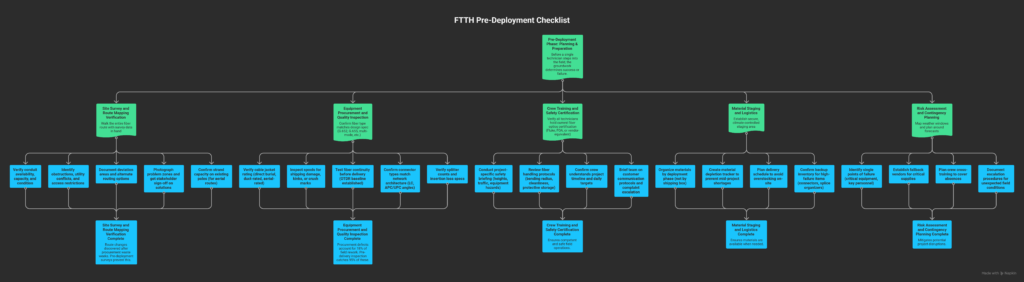
Before a single technician steps into the field, the groundwork determines success or failure.
Site Survey and Route Mapping Verification
- [ ] Walk the entire fiber route with survey data in hand
- [ ] Verify conduit availability, capacity, and condition
- [ ] Identify obstructions, utility conflicts, and access restrictions
- [ ] Document deviation areas and alternate routing options
- [ ] Photograph problem zones and get stakeholder sign-off on solutions
- [ ] Confirm strand capacity on existing poles (for aerial routes)
Why it matters: Route changes discovered after procurement waste weeks. Pre-deployment surveys prevent this.
Equipment Procurement and Quality Inspection
- [ ] Confirm fiber type matches design spec (G.652, G.655, multi-mode, etc.)
- [ ] Verify cable jacket rating (direct burial, duct-rated, aerial-rated)
- [ ] Inspect spools for shipping damage, kinks, or crush marks
- [ ] Test fiber continuity before delivery (OTDR baseline established)
- [ ] Confirm connector types match network architecture (LC, APC/UPC angles)
- [ ] Verify splitter counts and insertion loss specs
Industry standard: According to Telecompetitor research on fiber quality issues, procurement defects account for 18% of field rework. Pre-delivery inspection catches 95% of these.
Crew Training and Safety Certification
- [ ] Verify all technicians hold current fiber optics certification (Fluke, FOA, or vendor-equivalent)
- [ ] Conduct project-specific safety briefing (heights, traffic, equipment hazards)
- [ ] Review fiber handling protocols (bending radius, cleanliness, protective storage)
- [ ] Confirm crew understands project timeline and daily targets
- [ ] Brief team on customer communication protocols and complaint escalation
Material Staging and Logistics
- [ ] Establish secure, climate-controlled staging area
- [ ] Organize materials by deployment phase (not by shipping box)
- [ ] Create material depletion tracker to prevent mid-project shortages
- [ ] Plan delivery schedule to avoid overstocking on-site
- [ ] Confirm backup inventory for high-failure items (connectors, splice organizers)
Risk Assessment and Contingency Planning
- [ ] Map weather windows and plan around forecasts
- [ ] Identify single points of failure (critical equipment, key personnel)
- [ ] Establish fallback vendors for critical supplies
- [ ] Plan crew cross-training to cover absences
- [ ] Document escalation procedures for unexpected field conditions
Installation Phase: Fiber Deployment Checklist
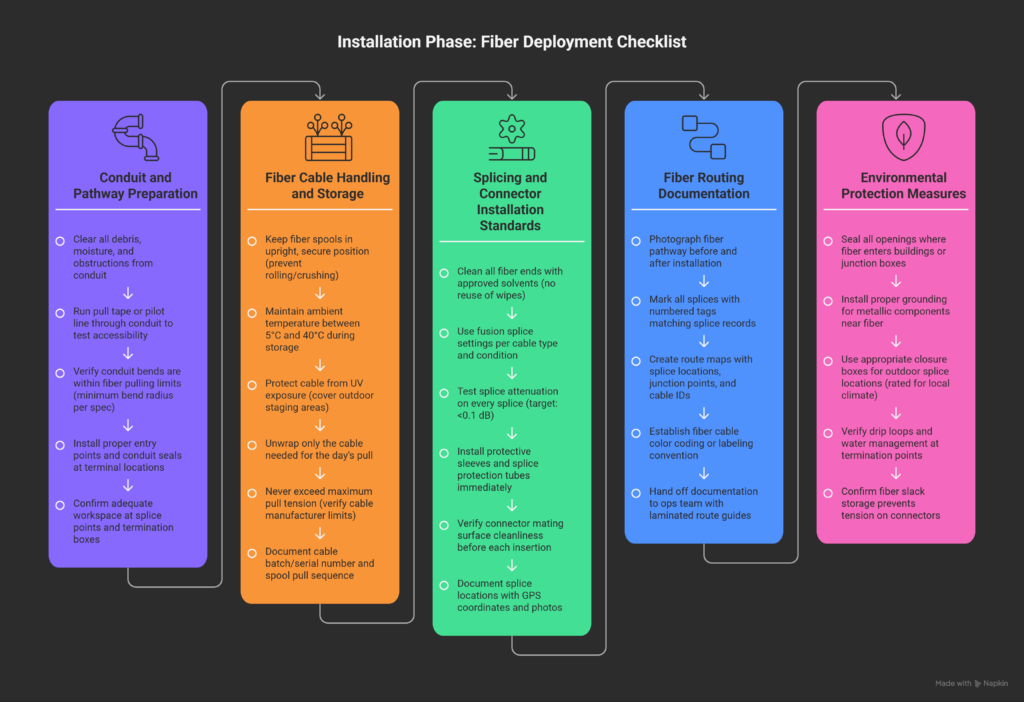
This is where the physical network comes to life. Installation quality directly determines operational reliability.
Conduit and Pathway Preparation
- [ ] Clear all debris, moisture, and obstructions from conduit
- [ ] Run pull tape or pilot line through conduit to test accessibility
- [ ] Verify conduit bends are within fiber pulling limits (minimum bend radius per spec)
- [ ] Install proper entry points and conduit seals at terminal locations
- [ ] Confirm adequate workspace at splice points and termination boxes
Fiber Cable Handling and Storage
- [ ] Keep fiber spools in upright, secure position (prevent rolling/crushing)
- [ ] Maintain ambient temperature between 5°C and 40°C during storage
- [ ] Protect cable from UV exposure (cover outdoor staging areas)
- [ ] Unwrap only the cable needed for the day’s pull
- [ ] Never exceed maximum pull tension (verify cable manufacturer limits)
- [ ] Document cable batch/serial number and spool pull sequence
Splicing and Connector Installation Standards
- [ ] Clean all fiber ends with approved solvents (no reuse of wipes)
- [ ] Use fusion splice settings per cable type and condition
- [ ] Test splice attenuation on every splice (target: <0.1 dB)
- [ ] Install protective sleeves and splice protection tubes immediately
- [ ] Verify connector mating surface cleanliness before each insertion
- [ ] Document splice locations with GPS coordinates and photos
Best practice: Fiber splicing errors account for 40% of field rework (per Light Reading industry analysis). Verification at splice time eliminates 95% of post-activation issues.
Fiber Routing Documentation
- [ ] Photograph fiber pathway before and after installation
- [ ] Mark all splices with numbered tags matching splice records
- [ ] Create route maps with splice locations, junction points, and cable IDs
- [ ] Establish fiber cable color coding or labeling convention
- [ ] Hand off documentation to ops team with laminated route guides
Environmental Protection Measures
- [ ] Seal all openings where fiber enters buildings or junction boxes
- [ ] Install proper grounding for metallic components near fiber
- [ ] Use appropriate closure boxes for outdoor splice locations (rated for local climate)
- [ ] Verify drip loops and water management at termination points
- [ ] Confirm fiber slack storage prevents tension on connectors
Testing & Validation Phase: Field Testing Checklist
You can’t activate what you haven’t validated. Testing is where deployment quality becomes measurable.
Optical Time-Domain Reflectometer (OTDR) Testing
- [ ] Capture OTDR baseline from both directions on each fiber
- [ ] Document launch conditions and test wavelength (1310 nm, 1550 nm, or both)
- [ ] Identify all events (splices, connectors, bends) and mark on map
- [ ] Compare to pre-installation baseline and design specifications
- [ ] Flag any unexpected events or attenuation spikes
- [ ] Archive OTDR files with timestamp and technician name
Continuity and Loss Verification
- [ ] Verify continuity on every core with light source and power meter
- [ ] Test from both fiber ends (confirms no directional issues)
- [ ] Record insertion loss at each termination point
- [ ] Verify loss within specification before activation
- [ ] Document any cores with unacceptable loss and schedule rework
Insertion Loss and Return Loss Measurements
- [ ] Calibrate power meter and light source daily (reference standard)
- [ ] Measure loss at each splice and connector with proper jumpers
- [ ] Record both UPC and APC measurements if mixed connector types exist
- [ ] Verify total link loss is within budget (design target + 2 dB margin)
- [ ] Confirm return loss meets spec for networks using Raman amplification
Power Meter and Light Source Validation
- [ ] Test meters and sources with known reference cables daily
- [ ] Verify battery condition and charge levels before field deployment
- [ ] Confirm wavelength accuracy (±5 nm tolerance)
- [ ] Document equipment serial numbers and calibration dates
- [ ] Maintain calibration certificates on-site
Testing Documentation Requirements
- [ ] Create test report with project name, date, technician, and weather conditions
- [ ] Include OTDR trace files and power meter readings (attach or reference)
- [ ] Record acceptance criteria and test result status (Pass/Fail)
- [ ] Document any failed tests and planned remediation
- [ ] Obtain customer or project manager sign-off on test results
Handover & Commissioning Phase
Installation is complete. Now comes the handover that determines whether the network actually works in production.
Network Activation Procedures
- [ ] Coordinate activation window with all stakeholders (NOC, field team, customer)
- [ ] Power on OLT (optical line terminal) and confirm startup diagnostics
- [ ] Verify transceiver signal levels within acceptable range
- [ ] Activate ONTs (optical network terminals) in sequence, not all at once
- [ ] Confirm no alarm conditions in element management system
Customer CPE Installation and Configuration
- [ ] Install ONT at customer premises per design specs (indoor/outdoor)
- [ ] Verify fiber routing avoids stress on customer equipment
- [ ] Configure ONT with correct provisioning credentials
- [ ] Test downstream and upstream signal quality at customer location
- [ ] Leave customer with clear documentation on equipment location and reset procedures
Service Activation Testing
- [ ] Verify downstream power levels on each ONT (17-26 dBm typical range)
- [ ] Confirm upstream power levels stay within limits (0-+6 dBm typical)
- [ ] Test broadband speed (verify against SLA commitment)
- [ ] Confirm VOIP dial tone and call completion (if bundled)
- [ ] Verify IPTV video quality and channel load times (if bundled)
- [ ] Document any service issues and escalate to NOC
Documentation Handover to Operations
- [ ] Deliver complete as-built route maps and splice records
- [ ] Hand off OTDR traces and test reports in searchable archive
- [ ] Provide ONT provisioning file exports and activation credentials
- [ ] Create runbook for common troubleshooting scenarios
- [ ] Schedule knowledge transfer call with ops team
Punch-List Closure and Final Sign-Off
- [ ] Identify any incomplete items or deferred work
- [ ] Schedule rework with clear completion deadline
- [ ] Obtain customer and project manager sign-off on all complete sections
- [ ] Document any customer concerns or requested follow-ups
- [ ] Confirm payment authorization once all items are closed
Common FTTH Deployment Mistakes (And How to Avoid Them)
Field teams make the same mistakes repeatedly because they’re not always obvious until the damage is done.
Over-Tightening Connectors Every connector has a torque spec (usually 0.5–1.5 Nm). Over-tightening crushes ferrules and introduces micro-cracks that show up as high loss. Use a torque wrench, not feel.
Insufficient Cable Slack Allowances Fiber doesn’t compress. When ambient temperature drops, tight installations go into tension and connectors break. Always install 5–10% slack in outdoor routes.
Skipping Environmental Sealing Steps Water ingress and UV exposure are silent killers. Unsealed splice boxes fail mysteriously after 6–12 months. Seal everything the first time.
Poor Documentation Practices Operations inherits a black box. Without clear splice maps and fiber records, rework becomes guesswork. Document at installation, not after.
Inadequate Crew Coordination Splicing happens in one location while testing happens elsewhere. If teams don’t sync, defects slip past discovery. Daily stand-ups and real-time status updates prevent this.
Tools & Resources to Streamline Your FTTH Checklist
Modern deployment doesn’t happen on paper anymore.
Mobile Field Documentation Apps Real-time apps let technicians log checklist items, capture photos, and store OTDR files directly in the cloud. This eliminates end-of-day data entry and keeps information accessible.
Automated Checklist Generators Manually building checklists for every project invites inconsistency. A proper framework tool generates project-specific checklists based on network design, deployment scope, and equipment type. Many teams use automated technician checklist generators to standardize their process and reduce training burden.
Integration with Project Management Platforms Connect your field checklist system to Asana, Monday.com, or equivalent. This creates automatic work orders, tracks crew productivity, and feeds real-time status to leadership dashboards.
Industry Standards and References
- TIA-604 (Fiber Optic Connector Intermateability Standards)
- IEC 60794 (Optical Fiber Cable Specifications)
- Telecom Standards Body (TSB) publications on FTTH deployment best practices
For operators working to increase customer take-rate after deployment, understanding the technical foundation improves customer confidence and reduces churn. Learn how operators increase take-rate through better service quality and customer experience.
Your FTTH Deployment Starts This Week
You now have a framework that covers every phase of deployment: planning, installation, testing, and handover. The difference between a flawless deployment and a costly rework project is whether this checklist gets followed consistently.
Here’s what to do right now:
- Download or adapt this checklist for your next project
- Customize it for your specific equipment and network topology
- Train your team on each section before deployment begins
- Use the automated checklist generator to create role-specific versions for splicing crews, test teams, and installation teams
The best time to prevent a deployment disaster is before it happens. This checklist is your insurance policy.